Full collaboration. Minimal blast radius.
Invite team members to your vault. They get access to the projects you choose, with the permissions you define. Secret access is automatic with project membership. Machine permissions are granular and explicit.

Project-scoped access
Team members only see the projects you add them to. Each project has its own independent encryption, so access to one project reveals nothing about another. Remove a member from a project and their access is revoked instantly, including all their machines.
Docs →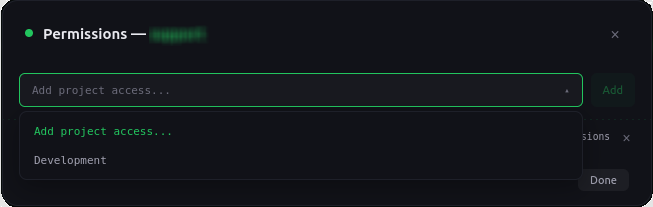
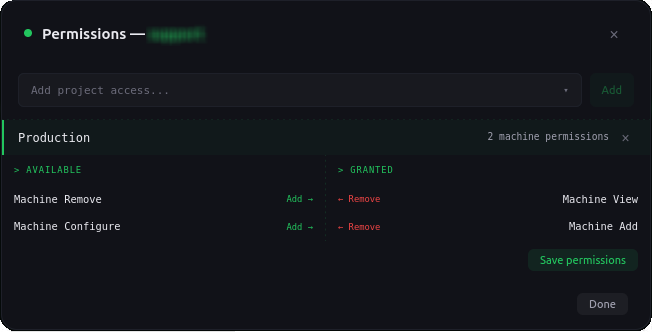
Two-tier permission model
Adding a team member to a project automatically grants them full secret access: view, create, delete, replace, version history, and notes. Machine permissions are separate and granular. You explicitly grant each one: view machines, add machines, remove machines, and configure machine access.
Encryption is transparent
Team members don’t manage encryption keys. Every project has its own master key, and every secret has its own data key. Encryption and decryption happen automatically when team members create, read, or update secrets. They just work with their projects — the cryptography is invisible.
Docs →
Designed for real teams
Instant revocation
Remove a team member and all their project access and machine grants are revoked in a single operation.
Audit everything
Every team action is logged: invites sent, accepted, declined, permissions changed, members removed. Attributed to the user who performed it.
External vault access
Team members see shared vaults in their sidebar alongside their own. Each vault is independent with its own projects and secrets.
Subscription-gated
Team member limits are tied to the vault owner's plan. Free plans have no team members. Paid plans scale up.
No admin hierarchy
The vault owner has full control. Team members have the permissions they're granted. There are no roles, no groups, no inheritance chains.
Real-time updates
When permissions change, the dashboard updates live via SSE. No refresh needed.
Your team shouldn't need your password manager.
Set up team access in minutes. No credit card required.
Get Started Free